
How can we help you?
How to Fix the RDP CredSSP Encryption Oracle Remediation Error
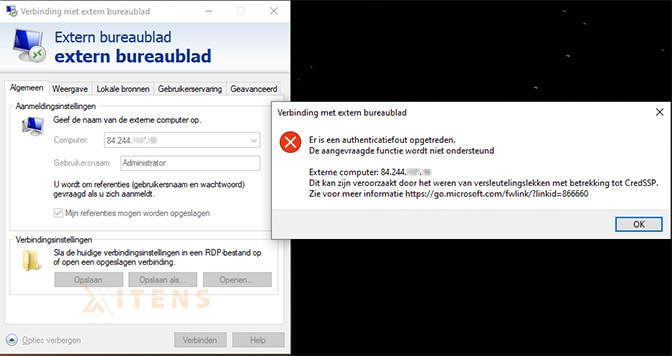
When you use Remote Desktop Connection to access a Windows server, you may receive the error message:
An authentication error has occurred.
The requested feature is not supported. optreden.
This is due to Oracle making a change to the CredSSP coding. This error message usually appears when the Remote Desktop Connection client and the remote server are unable to establish a secure connection due to a problem with the CredSSP (Credential Security Support Provider) protocol.
1. After start, right click on the logo and then choose Windows PowerShell (Admin) of Command Prompt (Admin) This is also possible in some Windows versions Terminal (Administrator) then choose this option.
2. Copy and paste the following text into the window and press enter:
REG ADD HKLM\Software\Microsoft\Windows\CurrentVersion\Policies\System\CredSSP\Parameters\ /v AllowEncryptionOracle /t REG_DWORD /d 2

3. Now restart your device. You can now use RDP without any problems.

An authentication error has occurred.
The requested feature is not supported. optreden.
This is due to Oracle making a change to the CredSSP coding. This error message usually appears when the Remote Desktop Connection client and the remote server are unable to establish a secure connection due to a problem with the CredSSP (Credential Security Support Provider) protocol.
How can I fix the CredSSP encryption oracle remediation?
Follow these steps to resolve the CredSSP Encryption Oracle Remediation error on your device.1. After start, right click on the logo and then choose Windows PowerShell (Admin) of Command Prompt (Admin) This is also possible in some Windows versions Terminal (Administrator) then choose this option.
2. Copy and paste the following text into the window and press enter:
REG ADD HKLM\Software\Microsoft\Windows\CurrentVersion\Policies\System\CredSSP\Parameters\ /v AllowEncryptionOracle /t REG_DWORD /d 2
3. Now restart your device. You can now use RDP without any problems.